From the measurements to delivery, without redoing drawings and sums.
Every view is a tab of the same job. Change one measurement and they all change together. Below, the path of one box, step by step, with drawings taken from the software.
Choose the box style, type in three measurements.
Length, depth and height. Cartis already knows how that style is built: lips, turn-ins and tolerances come from the board thickness and the chosen paper. In magnetic boxes the base board and the shell board are two separate thicknesses, and every calculation follows the right component.
- The parameters in one column: label on the left, value on the right, unit written once.
- The paper redraws itself at every change.
- Search everything with Ctrl+K: customers, jobs, lines (by size too), papers, machines, cutting dies.
Example: the values are made up.
The flat layout, already right.
For every piece of the box Cartis draws the wrap paper and the board, dimensions showing. Base and lid, body and sleeve, shell and tray: all consistent with one another, because they come from the same three measurements.
Ready for the die maker.
Cuts, creases, dimensions and metres of cutting rule. Before you order a new die, Cartis checks the register for one you already have that will do: in the archive it was born from, 48 sizes out of 115 already existed under another code.
- Tooling: for each code you record availability, location, expected arrival and notes. Imported codes stay ‘To be checked’ until someone has checked them physically.
- In the quote, a matching size in the catalogue does not zero the tooling charge by itself: ‘already written off’ and ‘invoiced separately’ are explicit choices made on the job.
- In production the timer refuses to start if the die is recorded as on its way, ordered or unavailable.
The finished box, before the sample.
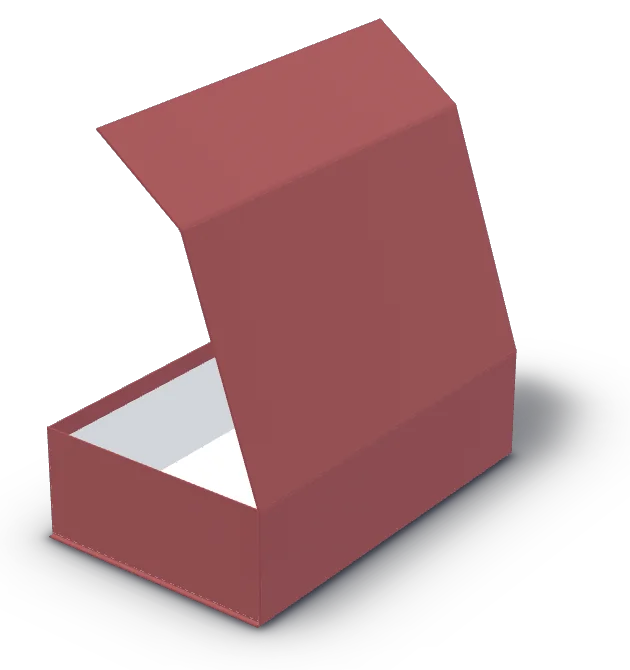
Pick the paper from the photographic catalogue: the box is already in 3D, with the real paper and a lid that opens. The same paper goes through to the artwork template and the customer document.
- Inner liner paper in White or Black; board interior Black, White or Paper-laminated. The choices appear in the documents.
- Share with the customer: a web link with the 3D proof, no financial data, valid for 60 days. They approve or ask for changes: the reply comes back into Cartis. Try the link
How many pieces, how many sheets.
For the paper and for the board: how many pieces fit the sheet size, how many sheets are needed, how much waste. The layout is nested with its true shape, not its bounding rectangle. If a piece does not fit, the summary flags it.
- Print layouts: several variants of the same job on the same print layout. Three plans side by side, ‘Fewer sheets’, ‘Reduce layouts’ and ‘Minimum layouts’: in a real case, 4 print layouts over 281 sheets instead of 10 over 280.
- Different papers and operations stay separate.
The right price, even at 200 pieces.
The median job is 200 pieces: at that volume a nominal 26% margin drops to 1.4% once make-ready and spoilage sheets are counted. Cartis always counts the fixed job costs, and shows the same price in the column, in the summary and in the bar.
- Quantity breaks; unit price to three decimals, total that matches.
- Quotation for the customer on your letterhead, with document templates. Before the PDF, the price list, company details and the price of every item are checked.
- Shop-floor estimate with explicit labels and collapsible details.
| Quantity | Paper | Unit price | Total |
|---|---|---|---|
| 250 pcs | Crush Ciliegia | — € | — € |
| 500 pcs | Crush Ciliegia | — € | — € |
| 1,000 pcs | Crush Ciliegia | — € | — € |
Sample document: the prices are yours and never appear on this site.
A layered file, at 1:1 scale.
Cut lines, creases and safe area on separate layers, with the paper and the inner finish stated. The designer works on the right file; when it comes back, Cartis checks the file received.
- Actual board thickness and coloured-interior item chosen from the catalogue; if the thicknesses differ, a warning appears.
- DXF, SVG and PDF export.
From the DXF to the sheet.
Trays, cavities and dividers read from the drawing and brought into 3D. Every incoming file is checked for unit and scale: 728 DXF files out of 1,002, in the archive Cartis was born from, declared a unit different from the real one.
- Foam: sheet with numbered cavities and cutting grid.
- Cutting time: machine time from the DXF with the plotter's speeds, and a sequence for the guillotine.
- Nesting: the pieces arranged on the sheet, with preview and recalculation.
- All of cutting on one page: file, foam sheet, nesting and machine time.
How many boxes per carton, how many cartons per pallet.
How many boxes fit in the shipping carton and how much the carton weighs. Cartons per layer, layers and pallets for the whole run: the answer the customer asks for right after the price.
Then the job, through to delivery.
Steps, departments and machines, assignments, purchasing and stock, job costing. Whoever is on the shop floor opens their view and finds the next operation. Deliveries have a calendar, promised date, delivery note, carrier and tracking.
To start2
In progress2
Completed2
Sample screen, with made-up data.
One engine, for every box type.
Every feature is written once and applies to every box style, from base & lid to foam inserts. When one changes, it changes for all of them.
Before you order a new die, Cartis checks whether you already have one that will do.
Layouts placed on the print sheet sizes, multiple print layouts and a comparison of the options.
Shaped inserts and foam read from the drawing, checked for unit and scale, brought into 3D.
Layered file at 1:1 scale with cut lines and safe area. The file is checked when it comes back.
A web link with the 3D proof of a single item, no financial data. The approval arrives in Cartis.
Machine time from the DXF with the plotter's speeds, and a sequence for the guillotine.
Make-ready and spoilage sheets always counted. Quantity breaks, quotation on your letterhead.
Boxes per carton, carton weight, cartons per layer, layers and pallets.
Labels for cartons and jobs, with file, preview and properties.
Sheet with numbered cavities, cutting grid, pieces arranged on the sheet.
Several people on the same job; changes to different fields merge, incompatible ones ask you to choose.
Every job with its history: who changed what, when and why.
Technical notes with box style, step, material, machine and reference sample, reusable in the job.
Your drawings stay yours, in open formats.
Scheduling with the overall machine load and the dependencies between jobs.
Step-by-step procedures inside the software; the help buttons open the guide at the right point.
See it on your own products.
Twenty minutes, on site or by video call. Bring a box: you see it generated live, from the measurements to the 3D, the flat layout and the sheet yield.